 Summarize in ChatGPT
Table of Contents
- What Is a Google Ads Campaign?
- What Changed in Google Ads Between 2022 and 2026
- Step 1: Choose the Right Campaign Type
- Step 2: Set Up Conversion Tracking Before You Launch
- Step 3: Build Your Keyword List
- Step 4: Write Responsive Search Ads That Earn the Click
- Step 5: Understand Why the Highest Bid Does Not Win
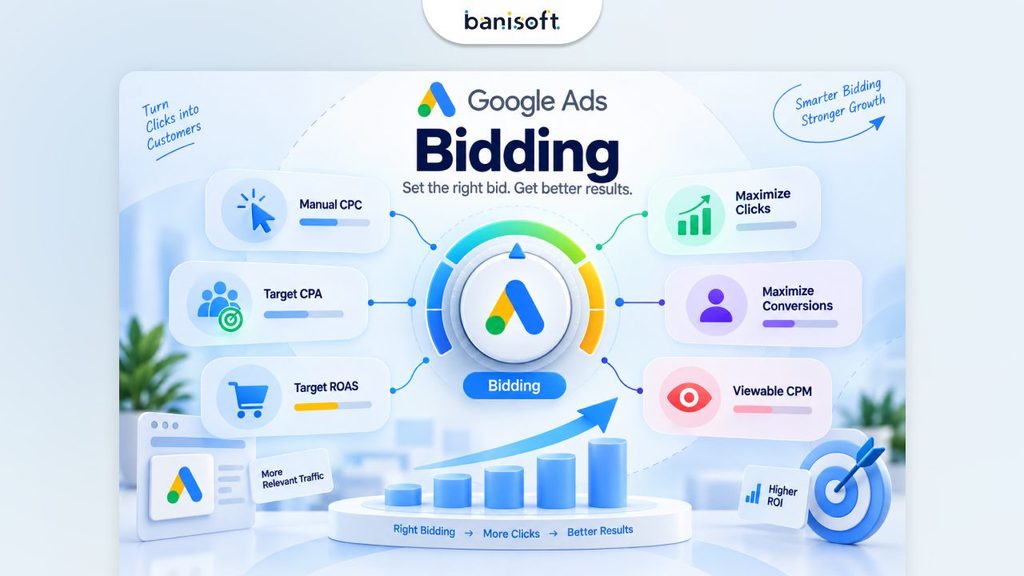
- Step 6: Choose a Bidding Strategy and a Budget
- Step 7: Match Your Landing Page to Your Ad
- Step 8: Set Location, Schedule and Exclusions
- Step 9: Launch, Then Optimise on a Schedule
- Common Mistakes That Waste the First Month
- Frequently Asked Questions
- Where to Start This Week
Key Takeaways
Set up conversion tracking before you launch, not after. Without it, Google’s AI has nothing to optimise towards and your first month of spend is wasted. Responsive Search Ads are the only standard search ad format. Expanded Text Ads were discontinued on 30 June 2022. Any guide still quoting 25-character headlines is a decade out of date. Current limits: 15 headlines at 30 characters, 4 descriptions at 90 characters, two 15-character display paths. The highest bid does not win. Ad Rank combines your bid with ad quality, landing page experience and expected asset impact which is why a smaller advertiser can outrank a bigger one. Negative keywords are the fastest money you will save. Most new accounts waste 20–40% of their first month on searches that were never going to convert.
Most Google Ads accounts do not fail because the ads were badly written. They fail because the account was built in the wrong order ads launched before conversion tracking existed, budget spent for three weeks, and no way to tell which clicks were worth anything.
This guide fixes that. Nine steps, in the order a practitioner would actually do them, using the platform as it exists in 2026 rather than as it existed when most guides on this topic were written.
If you have read older Google Ads tutorials, start with the “What Changed” section below. Several of the formats those guides describe no longer exist.
What Is a Google Ads Campaign?
A Google Ads campaign is a container inside your Google Ads account that holds a budget, a bidding strategy, a location and language setting, and one or more ad groups. The campaign type you choose determines where your ads can appear Search results, Shopping, YouTube, Gmail, Maps, or across all of them at once.
Everything else in this guide sits inside that structure. Get the container wrong and no amount of good ad copy rescues it.
What Changed in Google Ads Between 2022 and 2026
This section exists because most guides ranking for this topic quietly describe a platform that has moved on. If you follow instructions built around any of the retired formats below, you will not be able to find them in the interface.
| Retired / changed | When | What replaced it |
| Expanded Text Ads | Discontinued 30 June 2022 | Responsive Search Ads |
| Smart Shopping and Local campaigns | Absorbed 2022–2023 | Performance Max |
| Discovery campaigns | Upgraded 2023–March 2024 | Demand Gen |
| Video Action campaigns | Upgraded April 2026 | Demand Gen |
| Standalone Display campaigns | Retired mid-2026 | Demand Gen |
| Dynamic Search Ads | Auto-upgrading from September 2026 | AI Max for Search |
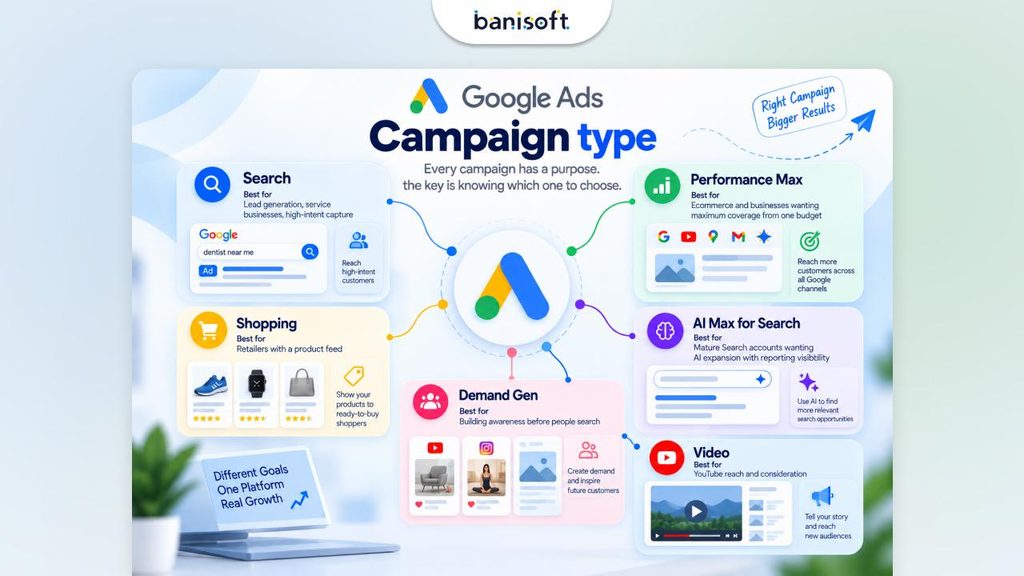
The practical effect: in 2026 you are choosing between Search, Performance Max, Shopping, Demand Gen, Video, App and AI Max for Search. Nothing else.
Step 1: Choose the Right Campaign Type
Campaign type is the first real decision and the most consequential. Choosing wrong does not self-correct it routes your budget to people who were never going to buy.
| Campaign type | Best for | What you control | What you give up |
| Search | Lead generation, service businesses, high-intent capture | Keywords, ad copy, bids, negatives | Reach beyond search results |
| Performance Max | Ecommerce and businesses wanting maximum coverage from one budget | Assets, audience signals, search themes | Placement and keyword-level control |
| Shopping | Retailers with a product feed | Product-level bidding, feed quality | Text ad messaging |
| Demand Gen | Building awareness before people search | Audiences, creative, placements | Immediate high-intent conversions |
| AI Max for Search | Mature Search accounts wanting AI expansion with reporting visibility | Budget, assets, exclusions | Some query-level control |
| Video | YouTube reach and consideration | Creative, audience, placements | Direct response performance |
If you are a local service business or a B2B company running your first campaign, start with a Search campaign. It gives you the most control, the clearest data, and the shortest path to understanding what your customers actually search for. Add Performance Max later, once you have conversion data worth optimising against.
Google now promotes a “Power Pack” structure for advertisers running at scale: Performance Max for cross-channel reach, AI Max-enabled Search for high-intent capture, and Demand Gen for upper-funnel demand. That is a month-six structure, not a week-one structure.
Step 2: Set Up Conversion Tracking Before You Launch
This is the step most guides put last and most accounts get wrong.
Google Ads bidding is now almost entirely automated. Smart Bidding decides how much to bid for each individual auction based on the likelihood that click converts. If Google cannot see conversions, it has nothing to optimise towards so it optimises for clicks instead, and you pay for traffic rather than customers.
What to set up before your first ad goes live:
Install the Google tag on every page of your site. Define your primary conversion action a form submission, a phone call, a booking, a purchase. Not a page view. Not a scroll. Import GA4 conversions if you already have GA4 configured, or set conversions up natively in Google Ads. Turn on enhanced conversions to recover conversion data lost to browser restrictions. Set up call tracking if phone calls are a real lead source. For most service businesses they are the majority of leads. Configure Consent Mode if you operate in the UK or EU. Test it. Submit your own form and confirm the conversion appears in Google Ads within 24 hours.
Do not launch until that test passes. A campaign running blind for three weeks costs more than the delay.
Step 3: Build Your Keyword List
Keyword research answers one question: what does a person type when they are ready to buy what you sell?
Start with Google Keyword Planner inside your Ads account. Supplement with your own search terms report once you have data, and with the questions customers actually ask you on the phone.
Sort keywords by intent, not volume
| Intent tier | Example | Priority |
| Ready to buy | “emergency plumber near me”, “buy running shoes online” | Start here highest conversion rate |
| Comparing | “best CRM for small business”, “plumber prices Manchester” | Second good volume, moderate intent |
| Researching | “how does a heat pump work” | Later, and usually better served by SEO than paid |
| Brand | Your own company name | Cheap, high-converting, and worth defending |
Match types in 2026
Broad match, phrase match and exact match all still exist. What changed is Google’s guidance: when you are using Smart Bidding, Google now recommends broad match as the default, because it gives the AI more signals to work with.
That advice is sound once you have conversion data and a solid negative keyword list. It is dangerous on day one. Start with phrase and exact match, gather two to four weeks of search term data, then test broad match on your best-performing ad groups.
Negative keywords are not optional
Before you launch, add negatives for: “free”, “cheap”, “jobs”, “careers”, “salary”, “DIY”, “how to”, “course”, “training”, and your competitors’ brand names if you do not want to bid on them.
Then review the search terms report twice a week for the first month and add every irrelevant query you find. This single habit typically saves 20–40% of a new account’s wasted spend.
Step 4: Write Responsive Search Ads That Earn the Click
Responsive Search Ads are the only standard search ad format available. You supply the components; Google assembles and tests combinations.
Current character limits
| Field | Limit | How many |
| Headline | 30 characters | Up to 15 (minimum 3) |
| Description | 90 characters | Up to 4 (minimum 2) |
| Display path | 15 characters | 2 optional fields |
| Business name | 25 characters | 1 |
| Final URL | No practical limit | 1 |
Google shows two to three headlines and one to two descriptions per impression, drawn from your pool. Every letter, number, space and punctuation mark counts. Emoji count as two or more.
How to write them properly
Write all 15 headlines. Ads with only three to five headlines typically score “Poor” or “Average” on Ad Strength, which throttles how often they serve. Make each headline stand alone. Google may show any headline in any position, so “Step 1: Book Online” breaks the moment it appears third. Include your main keyword in at least two headlines, then use the rest for benefits, proof, objections and calls to action. Use descriptions for substance, not overflow. One for your key benefit, one for a call to action or an objection you hear on every sales call. Pin sparingly. Pinning a headline to a fixed position reduces the combinations Google can test. Pin only when a legal or brand requirement forces it pinning all three positions turns your RSA back into a static ad and defeats the format.
Add your ad assets
Assets (formerly called extensions) increase the physical size of your ad and lift click-through rate at no extra cost per click. At minimum add: sitelinks, callouts, structured snippets, and a call asset. Add location assets if you serve a local area, and image assets where relevant.
Step 5: Understand Why the Highest Bid Does Not Win
A persistent myth repeated in a lot of older content is that you simply bid your way to the top of the page. You do not.
Google ranks ads using Ad Rank, which combines your bid with the quality of your ad, the experience your landing page provides, the context of the search, and the expected impact of your assets. A well-built account with relevant ads and a fast, matching landing page can outrank a competitor bidding significantly more.
This matters commercially. Improving relevance lowers what you pay per click for the same position. It is usually cheaper to fix your landing page than to raise your bids.
Step 6: Choose a Bidding Strategy and a Budget
Bid strategy by account stage
| Stage | Strategy | Why |
| Week 1–2, no conversion data | Maximise Clicks with a bid cap | Gathers data quickly without runaway costs |
| 15–30 conversions logged | Maximise Conversions | Google has enough signal to optimise |
| Stable cost per lead established | Target CPA | Holds your acquisition cost at a known number |
| Ecommerce with revenue tracking | Target ROAS | Optimises for revenue, not lead count |
| Very small budgets, tight control | Manual CPC | Slower, but fully predictable |
Setting the budget
Google Ads budgets are set daily at campaign level, and daily spend can exceed your budget on high-traffic days while averaging out across the month.
The practical floor: your daily budget should be at least three to five times your expected cost per click. If clicks in your industry cost £4, a £10 daily budget buys two clicks and never gathers enough data to optimise. Fewer campaigns with adequate budget always outperform many campaigns starved of it.
For a realistic view of what to expect in your industry, see our breakdown of how much Google Ads costs in 2026.
Step 7: Match Your Landing Page to Your Ad
This is where most campaigns leak money after everything else is right.
If your ad promises same-day emergency repairs and the click lands on your generic homepage, the visitor has to hunt for what they were promised. Most will not. Google also factors landing page experience into Ad Rank, so a mismatch raises your cost per click as well as lowering your conversion rate.
What a converting landing page needs:
The exact promise from your ad, repeated in the H1. One clear action a form, a call button, or a booking link. Not five competing options. A form short enough to complete on a phone: name, contact, and the one detail you actually need. Trust signals near the form: reviews, accreditations, guarantees, years in business. Load time under three seconds on mobile. No navigation menu competing for the click, if you are building a dedicated landing page.
One page per campaign theme. If you run three service campaigns, you need three landing pages.
Step 8: Set Location, Schedule and Exclusions
Location targeting. Target where your customers are, not where you would like them to be. Check the location options setting the default includes people “regularly in or showing interest in” your target area, which for most local businesses should be narrowed to “presence” only.
Ad scheduling. If nobody answers the phone at 2am and your primary conversion is a call, do not pay for 2am clicks. Review the hour-of-day report after four weeks and adjust.
Device adjustments. Look at conversion rate by device after a month. Many B2B accounts convert far better on desktop; most local service accounts convert on mobile.
Audience exclusions. Exclude existing customers from acquisition campaigns if you have a customer list to upload.
Step 9: Launch, Then Optimise on a Schedule
The first month is data collection, not judgement. Resist the urge to change everything on day three.
| Cadence | What to do |
| Twice weekly, month 1 | Review the search terms report. Add negative keywords. Nothing else. |
| Weekly | Check spend pacing, conversion volume, and cost per conversion by campaign |
| Fortnightly | Review Ad Strength; replace the lowest-performing headlines and descriptions |
| Monthly | Review bid strategy performance, adjust budgets between campaigns, check impression share lost to budget and to rank |
| Quarterly | Review landing page conversion rates, test a new campaign type, audit your negative keyword lists |
The metric that decides everything is cost per booked customer not clicks, not impressions, not click-through rate. Those are diagnostics. Cost per customer is the result.
Common Mistakes That Waste the First Month
Launching without conversion tracking. Everything downstream is guesswork. Sending all traffic to the homepage. The single most common cause of a low conversion rate. Skipping negative keywords. You will pay for “free”, “jobs” and “how to” searches for weeks. Starting on broad match with no data. Broad match plus Smart Bidding works well later and burns budget early. Too many campaigns, too little budget. Three campaigns at £10 a day each learn nothing. One at £30 learns quickly. Changing bids daily. Smart Bidding needs one to two weeks to stabilise after any significant change. Ignoring the landing page. You cannot fix a 1% conversion rate with better ad copy.
Frequently Asked Questions
How much does it cost to start a Google Ads campaign?
There is no minimum spend, but there is a practical floor. Your daily budget should be at least three to five times the average cost per click in your industry, or the campaign never gathers enough data to optimise. For most small businesses in competitive service categories, that means £600 to £1,500 per month before management costs. Spending less is possible but usually produces data too thin to improve on.
What are the Google Ads character limits in 2026?
Responsive Search Ads allow headlines of 30 characters (up to 15 per ad, minimum 3), descriptions of 90 characters (up to 4, minimum 2), two display path fields of 15 characters each, and a business name of 25 characters. Spaces and punctuation count as characters. Expanded Text Ads, which had different limits, were discontinued in June 2022.
How long does it take for Google Ads to work?
Expect two to four weeks before the data is worth acting on and six to eight weeks before performance stabilises. Smart Bidding needs roughly 15 to 30 conversions before it can optimise reliably. Accounts that are restructured every few days never reach that point the most common reason a campaign “does not work” is that it was never left alone long enough to learn.
Should I use Search or Performance Max?
Start with Search if you are new to the platform, run a service business, or need control over which queries you pay for. Performance Max works best once you have conversion tracking established and enough conversion volume for Google’s AI to optimise against typically after two to three months. Many accounts eventually run both, with Search capturing high-intent queries and Performance Max extending reach.
What is a good Quality Score?
Seven or above is healthy; below five signals a real problem. Quality Score is a diagnostic made up of expected click-through rate, ad relevance and landing page experience. Rather than chasing the number, use its three components to find the weak link a low landing page experience score, for example, tells you where the fix is.
Do I need a separate landing page for Google Ads?
For most campaigns, yes. A dedicated landing page that repeats your ad’s promise and offers one clear action typically converts several times better than a homepage. If you only have budget for one, build it for your highest-value service and send that campaign there while other campaigns use your existing service pages.
Can I run Google Ads myself or should I hire someone?
You can absolutely run a single Search campaign yourself, and for a small local business with one service that is often the right call. The point where outside help pays for itself is usually when you are spending more than £1,000 a month, running multiple campaign types, or when the time you spend managing it is worth more elsewhere. The honest test: if your cost per lead has not improved in three months, the account has stopped learning from you.
Why are my Google Ads getting clicks but no conversions?
In order of likelihood: the landing page does not match the ad, conversion tracking is misconfigured so conversions are happening but not recording, your keywords are attracting research traffic rather than buyers, or your form is too long. Check tracking first a surprising share of “no conversions” problems are measurement problems, not performance problems.
Where to Start This Week
If you are setting up your first campaign, do these three things in this order:
Install conversion tracking and test it. Submit your own form and confirm it registers. Do not skip to step two until it does. Build one Search campaign, tightly themed. One service, ten to twenty phrase and exact match keywords, a full set of 15 headlines, and a negative keyword list. Point it at a matching landing page. Not the homepage.
Then leave it alone for two weeks except to add negative keywords.
Want it built properly the first time? Banisoft has been managing paid media for businesses across the USA, Canada, Australia and the UK since 2001. If you would rather have the tracking, campaign structure, ad copy and landing pages handled for you, we will audit your current account or build your first one – and show you exactly where the budget is going. Get a free Google Ads account review.