
Author name: Gagandeep Singh

Gagandweep Singh has been helping businesses turn marketing spend into measurable revenue since 2001. As co-founder of Banisoft.com, he's spent 25+ years running SEO, paid ads, email automation, and full-funnel strategies for clients across the USA, Canada, and Australia — in industries from law and medical to real estate, SaaS, and ecommerce.He holds certifications from Google, Meta, and HubSpot. He writes about what actually moves the needle — not marketing theory, but the strategies that generate leads, lower acquisition costs, and build businesses that grow.

How to test and improve SEO strategies for better search visibility? banner image

How to test and improve SEO strategies for better search visibility?

You want your website to rank on top of Google. And there’s no doubt that SEO is the best approach to it. You can get there with SEO test strategies. If you have a higher position on the SERP, you will have to get more clicks.

You must experiment and grow website traffic. There are multiple SEO testing options available out there. You just need to find the right ones.

So let’s get started… First, let’s understand

SEO testing evaluates the best ways to optimize your pages for the search engine results pages (SERPs). This is highly suggested for new companies, startups, and small businesses who want to experiment and find out how to improve their SEO strategy and gain results.

A popular method here is Split or A/B testing. It is suggested to weigh the possibilities for your SEO strategy. One can do this by dividing traffic into two different versions of the same page. When visitors interact with the different pages, data is collected. Based on the stats and conversions, you can decide which page is more effective.

There are 6 parts to any reliable SEO testing:

  • Ask a question that you want an answer to.
  • Make a hypothesis to understand what’s going to happen.
  • Remove variables and run the experiment.
  • Collect data.
  • Analyze the data.
  • Report on your results.

QTechnically, if you want your SEO strategy to improve, SEO Testing is the way to go. It is not that complicated, and you can learn how to do the SEO test. Some simple tools that can help you with the same are:

  • BuzzStream
  • Google Search Console
  • SEO Spider
  • SEMrush SEO Toolkit

However, every business is different, and so how to do the SEO test also varies. So you need to pick testing that works best for your business or service.

There are two kinds of SEO tests:

  • On-page SEO – This inspects what your site or the page is about
  • Off-page SEO – This inspects how authoritative, and popular your site is

The on-page SEO checklist includes:

  • Write effective title tags
  • Put targeted keywords in the title tag
  • Limit tags to 55-60 characters (with spaces)
  • Push keyword closer to title naturally
  • Don’t stuff your keywords
  • Include the brand at the title tag end, using a pipe bar to separate

Off-page SEO checklist includes:

  • Creating awesome content
  • Backlink where possible
  • Maximize social media shares
  • Outreach emails to influencers
  • Allow guest blogging

Off-page SEO adds tremendous value to your website. It compels the search engines to believe that your website is important to others. The links you receive, in turn, are an endorsement from another source — assuring the quality of your website.

On-page SEO is the optimization of whatever content is there on your website. This includes keyword optimization and internal linking. 

Remember that on-page SEO is within your control, but off-page is not. So off-page SEO must measure your page’s credibility.

With SEO testing, you can uncover the strengths and weaknesses of your SEO strategy. These SEO test strategies help you understand how and if you are missing out on valuable site traffic and qualified leads.

Ideally, this should be done at the beginning of the campaign. Conduct an SEO test before implementing an SEO campaign. Doing so will give you a baseline for where you started.

If you think you are getting a sub-par SEO grade when you will have time to fix the same.

One should run periodic SEO tests to ensure that your campaign is working properly. It also gives insight into the methods that are working and what areas still require improvement.

As discussed above, there are many SEO Testing Strategies. But what you should aim for is using them in tandem with your existing strategies.

1. Interlink the Target Page with Requisite Content Using the Keyword in the Anchor Text

If you want to improve SEO testing, you need to acquire a better keyword ranking. This helps Google understand the topic better. For example, in your existing strategy, add more LSI (Latent Semantic Indexing) keywords.

Internal anchor text is another strategy you can try. It helps Google understand critical keywords for your pages.

2. Enhance Meta Tags

Meta tags, including title tags and meta descriptions, send out a solid relevancy signal to get better rankings on the SERP. However, search behavior is constantly changing. Higher click-through SEO strategies alone won’t suffice.

That’s where you need to improve SEO testing to check the organic result in lieu of content that delivers what you require.

3. Introduce Semantic Keywords For Comprehensively Covering A Topic

Semantic keywords are related to keywords or phrases. Using them gives the visitor the ability to understand the subject in a practical way. Also, incorporating semantic keywords gives the content more authority.

For example, if you are looking for a vegetarian burger, you may get results similar to it like vegetarian sliders, vegetarian hot dogs, or even subs.

If you haven’t already, try this in your SEO test strategies to ensure that you have covered a subject in its entirety.

4. Structure Content

Content is king for any SEO test strategies. Make sure it is structured and easy to read.

Remove bold tags — they did matter for SERP but not anymore
Improve mobile visibility — most people read on phones now

5. Update Content That Other Pages Lack

Check out competitors and see what content you are missing. For example, are you starting your first line of the article so that it also becomes a good META description?
You can search “Google Snippet Rankings” to write short Q&A in your blogs, which helps you rank for snippets.

6. Add Schema to Your Content

Schema lets a visitor, and also the search engines get a better understanding of your website or page. Doing so helps it match the page to the appropriate queries.

As a result, you boost search visibility and CTR.

7. Add Backlinks

Backlinks boost search visibility, increase your prominence on the search engine, and indicate that other web pages find your site valuable.

#Tip: Monitor the status of your backlink to show backlink growth, top domains, and new and lost backlinks for nearly any domain globally. This is a great SEO test strategy.

8. Do Include Multimedia & Images

Images, infographics, and multimedia like videos, animated visuals, etc. retain visitors longer.

To boost ranking, include an ALT text on the captions of the images. Infographics are another great tool.

If you have infographics, you will notice that visitors prefer SEO Testing.

According to Forbes, 90% of information transmitted to the brain is visual according to the report, and visuals are known to improve learning and retention by 400%. You can see evident changes in your SERP when doing SEO Testing.

It’s simple. Just add more visuals, videos, and infographics to your existing content!

9. Remove Dates From URL

Don’t give dates in permalinks because it would result in 404 errors when you change it later. In particular, dates also make the visitor question your authenticity.

Would you read a 2019-2020 blog or a 2008 one on SEO testing? The new one, right? Especially since the algorithms have changed so much.

10. Prune Your Site

Do more pages mean more traffic? Nope

Consider the case of pruning that Everett Sizemore makes. Proactively remove stuff that doesn’t enhance quality. The less junk on the site, the higher the overall quality signal of your site.

Do SEO testing for:

  • No organic search traffic
  • Ranking > 50
  • No backlinks
  • No social shares

11. Optimize Answer Box

To rank on top of the SERP, optimize for the Answer Box/Featured Snippet. By securing the Answer Box for a query, you can be assured that your URL is seen.
Quick adjustments in your content can help you win the Answer Box.

Do answer the who, what, why, when, and how of a question relevant to the topic.

SEO testing frequency should depend on the kind of business you are. To improve SEO testing, an SEO audit should be done 2-3 times a year. For smaller businesses, once in 6 months also works.

If you want to improve SERP — then this Step by Step Guide For SEO Testing is the roadmap for you:

1. Do an SEO audit

SEO testing or audit improves your SEO. This SEO test will give you an update on what’s working well and where you can improve. This audit is an evaluation of your website to check your ability to appear on search engine results pages (SERPs)

2. Analyze test results

Once the audit is done, take a close look at your test results. Now is the time to personalize your SEO test strategies. Check what recommendations can make a significant impact.

Evaluate the SEO patterns and pinpoint the pain areas that need more wide-scale changes.

3. Redefine SEO strategy

Now that you have an update, your SEO strategy based on your test results redefines the same.

For this, you need to:

  • Identify your target audience
  • Conduct keyword research
  • Analyze your competitors:
  • Create your plan
  • Set up monitoring

4. Implement a new strategy

It is time to implement your new strategy. This should include your plans for improving, monitoring and measuring your SEO. Keep track of the same so that you can track and measure SEO testing results accurately.

5. Make changes when required

This is now a recurring process. You have to keep analyzing your SEO test strategies time and again so that you can constantly be at the top of your game. So, continue monitoring and do more SEO tests or audits.

Now that you are aware of the step-by-step guide for SEO testing, you must know the critical components of SEO Testing. These should not be missed out.

1. Test the impact of no-follow links

No-follow links may help increase website ranking along with traffic. One can try and use the Chrome extension, NoFollow, for the same.

2. Test social signals impact

Social media is powerful dynamite to boost traffic and reach new audiences. Can it also help your SEO?

Social signals impact SEO rankings. With consistent social signals, you can get higher rankings.

3. Test keyword intent

Some keywords perform better than others. While others get no traffic, pay attention to the intent behind the keywords. Focus on high-value and low-value together.

4. Test an AMP for your website

Google came out with AMP or accelerated mobile page websites. You can use the same to optimize your website, and mobile users. If possible, have both normal and mobile versions of the website — with testing, you can know which version works!

5. Test load speed impact

When did you last check the website loading? It will directly impact how Google will rank your website.

Good speed means a lower bounce rate, which is a great SEO strategy.

6. Test compelling title tags and meta descriptions

As mentioned earlier, this is a critical component of your SEO testing strategy. A compelling one with the right title tags and meta descriptions can help you get quicker and faster results.

At the end of the day, higher rankings for SEO mean more clicks. With SEO testing, you can get the right results. Sure there will be a few trials, but it will help you achieve goals and grow your business exponentially.

But this can happen only when you get your SEO right and run tests… So don’t miss that!

How to test and improve SEO strategies for better search visibility? Read More »
facebook messenger marketing image

Facebook Messenger Marketing for Boosting Business Leads

Facebook Messenger Marketing for Boosting Business Leads featured image

Hurray! Here’s one massive opportunity to boost up your sales up to 40 times through Facebook Messenger marketing.

How?

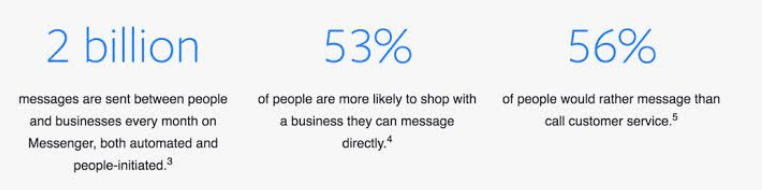
With Facebook’s 2 billion + users you can not only advertise your products or services to them but also send back and forth millions of messages between customers and businesses every month. 

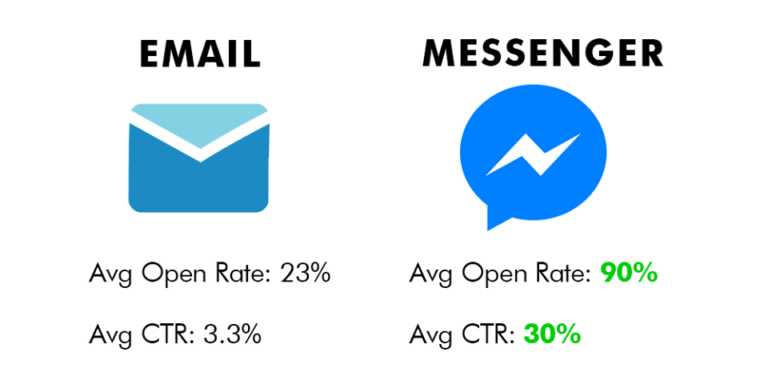
Email & Messenger opening rate & average CTR

When we communicate with our customers, we use emails (apparently, yes). People love messaging and hate peeping into emails all the time.

So,

Why not use a messaging app, Messenger (which they love) to communicate with instead of using emails (which they hate).

  • Open rates –  4 times better than email
  • Click through rates – 10 times better than email
  • Revenue per subscriber – about 5 times better than email

Quite amazing right?  If you are curious, keep reading.

MIGHT ALSO LIKE: Complete SEO Checklist for 2020 to Rank Higher

Communication has been changing for the past 10 – 15 years and it’s still not done yet. Particularly Facebook is gaining popularity and is winning over other communication methods. 

And, as of 2017, features added to Facebook Messenger have made it a huge platform to set up your brand product and your company apart in the eyes of the customer. 

It enables the company to start conversations with the customers, bring out the customers’ needs and their feedback and target them through advertising.

 Consider the following statistics:

  1. The Facebook page owners can reply to anyone who has commented on their page. This potential to message the customer directly is highly powerful. More than 90% of users have access to Facebook on their mobile phones and they are live on Facebook 15 times a day. 

If this number doesn’t give you goosebumps, think about it – 1.59 billion are just daily active users on Facebook.

Befriending with customers on this level changes business relationships into personal ones.


2. Customers want an instant response and that too NOT from a bot. More than 56% of consumers would prefer to send a message using an app. 

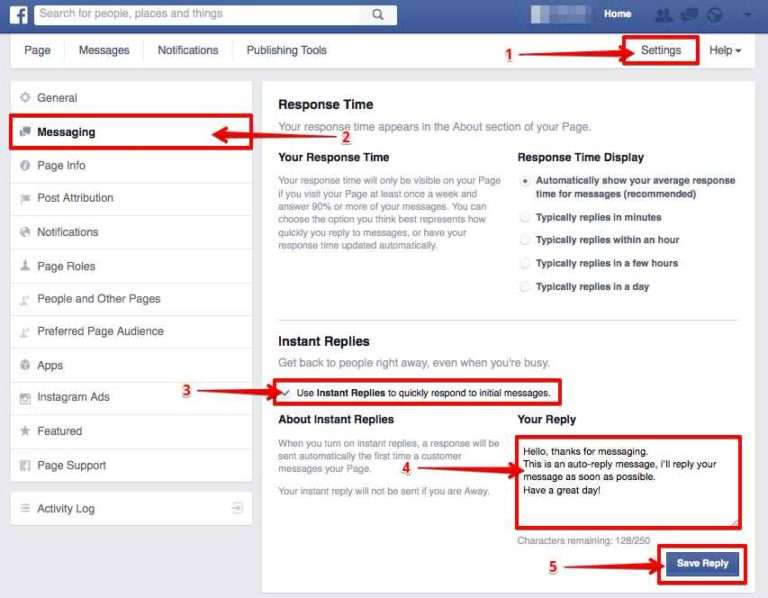
save auto messages for instant replies to save time

Writing Instant replies or messages ahead of time is a huge time-saver that makes you look not only professional but also efficient. 

According to Zendesk, the average time for a business to respond should be within 60 minutes.

Your ultimate target can be for the “very responsive to messages” badge.

All you need to have an average response time of 15 minutes with a 90% response rate over the last seven days.

Needless to say, if you want to motivate users to connect with you through Messenger, opt for a shorter response time

3. Establish your trust and show that you care – Integrating Messenger with customer service allows customers to communicate on their terms. No more waiting calls. 

With direct messaging (that too mobile friendly) the conversation not only stays in Messenger, but also it keeps a record of chat with the customer, thus refraining from starting the conversation from scraping.

You may also reduce labor costs by up to 30% by adding a chatbot to supervise any reasonable proposals for communication and preliminary dealings when your business is closed.

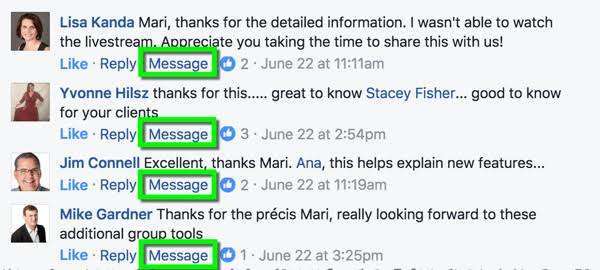
4. With Messenger, you can initiate a private conversation with anyone who either posts or comments on your page. 

Viewing the message publicly that the conversation with the specific person has begun in through a private message is certainly a very helpful feature if ever there’s a need to handle a situation offline.

5. Assisting in customer service by replying to a customer’s complaint on Facebook Messenger, enables an instant opportunity to show validation through social shares and likes.

6. Facebook Live- chat, between customers and businesses, helps them to build trust and a high level of customer satisfaction.

This improves the communication efficiency between the two and has the highest satisfaction rate – 73 %.

It is the ideal medium to provide customer service, elicit feedback, as well as to target or re-target leads through advertising. Keep reading to learn how.

MIGHT ALSO LIKE:  Website Redesign – 10 SEO Mistakes to Sidestep

The arrival of Social Media has changed the way of communication.

Social Media has given a new platform to consumers to put their thoughts into words and voices, to explore every corner of the world through their eyes and ears.

“The future of customer service goes through direct messaging on social media,” says Conversocial‘s CEO and founder, Joshua March.

Facebook Messenger is the perfect avenue for brands to connect to and communicate with customers

The emergence of Facebook Messenger and Social Media for customer services, in combination with SaaS solutions as well as advanced service desk technology, has provided the perfect conditions for rapid change –  where CSM (Customer Support Management) is no longer just customer support, but also about sales and marketing support.

1. Be Responsive

The priority is the customer’s expectation for a quick response. Issues can’t be stopped, they can happen anytime – even on weekends and at night.

Consider the statistics from The Social Habit:

  • 42% of consumers complaining through social media expect a response within an hour. 
  • 32% expect a response within 30 minutes.
  • 57% of consumers complaining through social media expect the same response time at night and on weekends as they would receive during normal business hours.

How bad a slow response time could be?

It can vandalize your brand’s name and revenue. An alarming report from the State of Multichannel Customer Service Report, highlights the impact of poor customer service:

When the rewards are great, so are the risks! 

A dissatisfied customer will complain publicly, probably sharing its experience with hundreds and thousands of people and elsewhere – a spine-chilling thought, isn’t it! 

But on the flip side, compliments from a customer on social media can create a blind trust that your brand would provide through services.

How?

Facebook displays your business chat response speed on your Facebook Fan Page-  (Facebook is smart too!).

Either way, it’s great for the customers as well as for the business.

Messenger bots and “customizable Away messages” can be an effective tool for serving customers quickly.

2. Conversational Commerce

Conversational commerce, a term coined by Uber’s Chris Messina, refers to the convergence of business/shopping either through messaging and chat apps like Facebook Messenger, WhatsApp, and WeChat or through voice technology, like Amazon’s Echo product, which interacts with customers through voice commands.

Customers can chat, ask questions, get personalized recommendations, read reviews, and click to purchase – all from within messaging apps. 

On the business front, companies can use chatbots to automate customer service messages. With chatbots, companies can send order confirmations in Facebook Messenger, as well as shipping and delivery notifications. 

N.B. – Do not rely much on Chatbots, although useful to cut costs yet always have the support from an expert to answer queries.

3. Upsell 

While providing customer support, it is ideal to upsell your product. Entice your customer on how to leverage the services for him. You can also opt for 

a. coupon codes or discount codes

b. Wiki sections, case studies, and blogs as personalized content for each service or product you provide and for each type of customer’s persona.

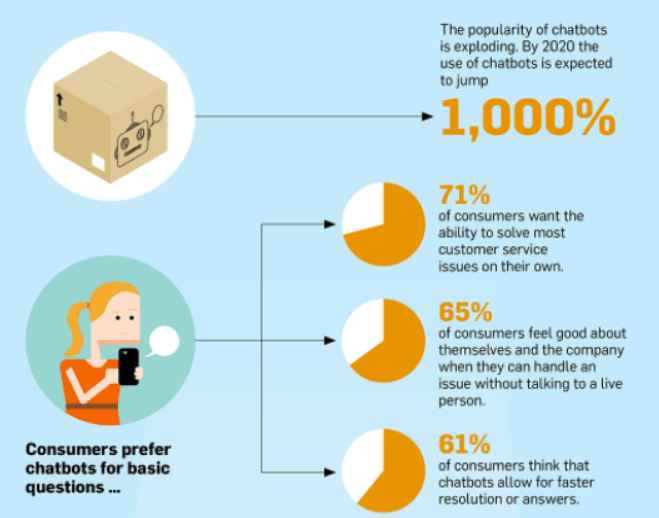
No doubt, Chatbots can augment your online availability, and also can pick up the slack of messages for you. With customers’ expectation to have 24/7 online availability on social media, businesses have restyled themselves to automation to meet the growing demand.

FACEBOOK MESSENGER & CHATBOTS

To use Facebook Messenger, you need to have a business Fan Page on Facebook.

Chatbots are extremely useful for dealing with simple queries, to provide automated online support when the team is not available.

Why?

  1. It can respond privately to a comment or a post – a quite useful way to let customers know that the authority has acknowledged the issue and has responded privately.
  2. All queries will go to the business’s Messenger inbox. No customer can ever send a message to your personal space – whether it be on mobile or desktop.

There are many platforms for creating Chatbots online and most of them require no coding. The simplest option includes:

  1. Chatfuel: Free basic option for creating bots for Facebook or Telegram
  2. ManyChat:  Facebook, limited Free version.
  3. ChattyPeople: Facebook + Slackbot
  4. FlowXO: the Most versatile platform- Messenger, Slack, Telegram, and web

One of the hard work to do is to keep up with the volume of messages and requests from customers.  What’s even more challenging is that customers want an instant response after they post a message, request, or complaint online.

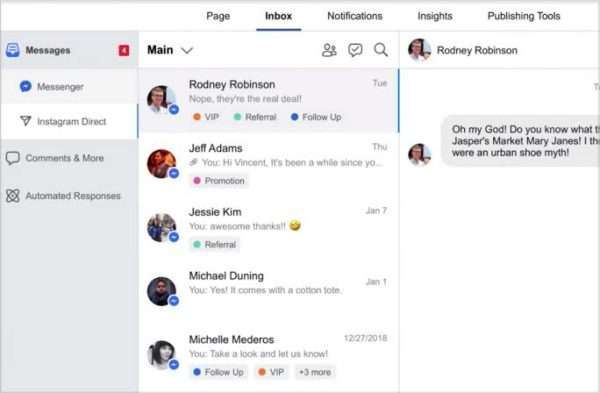
An integrated inbox can help you out. It integrates the messages of Messenger, Instagram, and Facebook. 

MANAGE CONVERSATION using INTEGRATED MESSENGER INBOX

It enables you to keep a check on all three channels without missing any messages. So, take advantage of the Integrated inbox. You just need to connect your Facebook page with your Instagram account.

The ability to reply on the public wall, post comments inside the Inbox, and mark them either ‘DONE’ or ‘FOLLOW UP’ is quite useful.  

Messenger Marketing is the act of marketing with customers using a messaging app.

Forbes has referred to Messenger Marketing as “the new way to do business.” 

A whopping 90% of people believe recommendations from friends, and 70% of people prefer to buy based on social media referrals. There’s a ton more you can do.

Great support converts to great reviews which in turn brings more sales. Where else can customers share their buying experiences with their friends and family, whether good or bad? FACEBOOK

Why should I use bots? Some facts can help you with: 

I’m more than 100% satisfied that messenger bots (Facebook Messenger) are the next big thing in online marketing and it can make your business more fortunate.

So, let me give you some more of those facts:

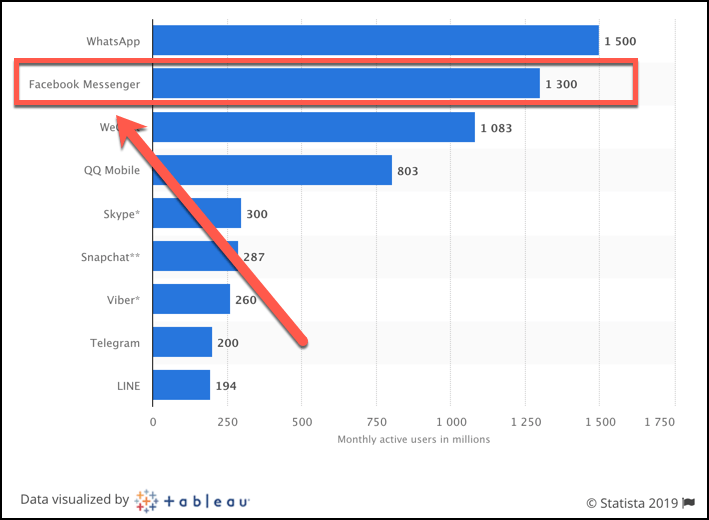
  • 1.2 billion (yes, billion) people use Facebook Messenger every month. Your potential customer is ALSO using Messenger.
  • It has the highest rate of engagement in terms of users and potential buyers.
  • Many prospective customers don’t feel like sharing their email addresses. This is called “email fatigue” – it’s real.
  • It provides the highest click rate for any type of traffic.
  • Messenger is a one-click subscription rather than having to type in email, click submit, confirm email, etc.
  • Prospective customers can engage in live chat, which helps to close sales faster and with less friction.
  • Retargeting your Messenger leads is easier, uncomplicated and faster than retargeting email leads.
  • Messenger is completely mobile and desktop-friendly. Please, no more mobile configuration for emails.
monthly active users of each social platform by tableau

The goal for business in customer service SHOULD BE always – “Make them come back next time!”.

Mirror your consumer’s behaviour and target them accordingly. It makes sense for a brand to engage users on mobile messaging apps first to raise awareness and then later to reengage them on both tablets and using secondary advertising.

A good example of this is onsite retargeting – specifically designed to lengthen your Facebook Messenger list. 

When done correctly, onsite retargeting can help you recover your potential users before they abandon your page, and give you a second chance to convert them into subscribers.

MIGHT ALSO LIKE: How Facebook Ads Can Boost Your E-commerce Business

Consumers are increasingly demanding more and more from their chosen brands, a conversation and a relationship that they can feel a part of and contribute to.

By engaging your customers, a business can benefit greatly from feedback. It’s a win-win for both business and customers since business wins loyalty and customers get better products which results in making them happier, later who will buy more.

With Facebook’s 2 billion+ + users, you can not only advertise your products or services to them but also send back and forth millions of messages between customers and businesses every month. 

Facebook Messenger Marketing for Boosting Business Leads Read More »

Scroll to Top